
Increasing website traffic: more than just SEO
Most guides on increasing website traffic consist three quarters of search engine optimisation. That is the slowest channel of them all, and it is the only one where somebody else's algorithm decides whether your work becomes visible. So what you will find here are only the five SEO points that account for most of the effect on most sites — the remaining 25 tips fetch visitors from elsewhere.
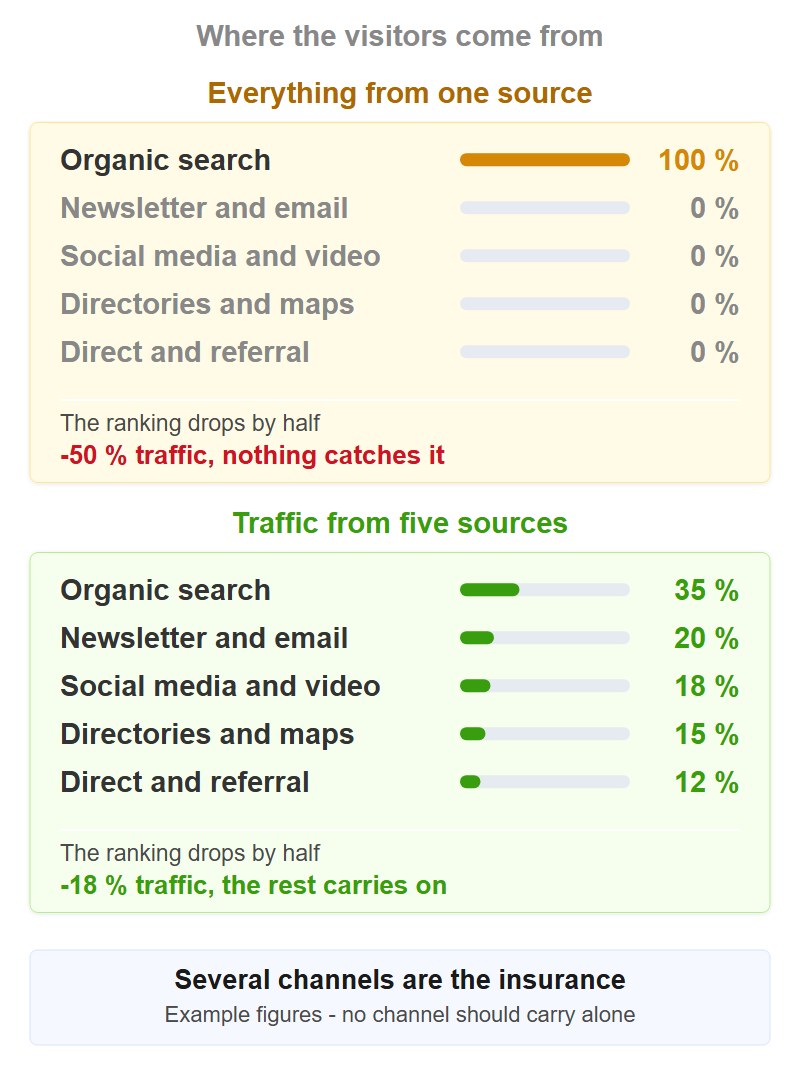
This is not a matter of taste but of spreading risk. If all your traffic comes from one source, your business hangs on a decision somebody else makes. Anyone who also runs a mailing list, a profile in map search, two communities and a video channel loses perhaps a third when a ranking drops — instead of everything.
Every tip is written so that you can implement it without further research: what is behind it, how you go about it in concrete terms, which mistake happens most often and what you may realistically expect.
Three things are assumed: your site is online, it has content, and you have access to Google Search Console. If you are still before that point — domain, indexing, the first entries — get those basics in place first and come back here afterwards. The tips here start where the groundwork stands and it is about growth.
The 30 tips at a glance
Eight areas, thirty measures. The right-hand column is the most important: it tells you when you may expect the first visible effect — and stops you writing off a slow channel as failed after two weeks.
| Area | Tips | First effect |
|---|---|---|
| SEO groundwork | 1 – 5 | 2 – 6 weeks |
| AI search and AI Overviews | 6 – 7 | 1 – 3 months |
| Social media and video | 8 – 11 | 4 – 8 weeks |
| Communities, guest posts, PR | 12 – 16 | days |
| Linkable content | 17 – 19 | 2 – 8 weeks |
| Newsletters and email flows | 20 – 23 | immediately to 4 weeks |
| Directories, maps, offline | 24 – 27 | 1 – 4 weeks |
| Paid and bought traffic | 28 – 30 | immediately |
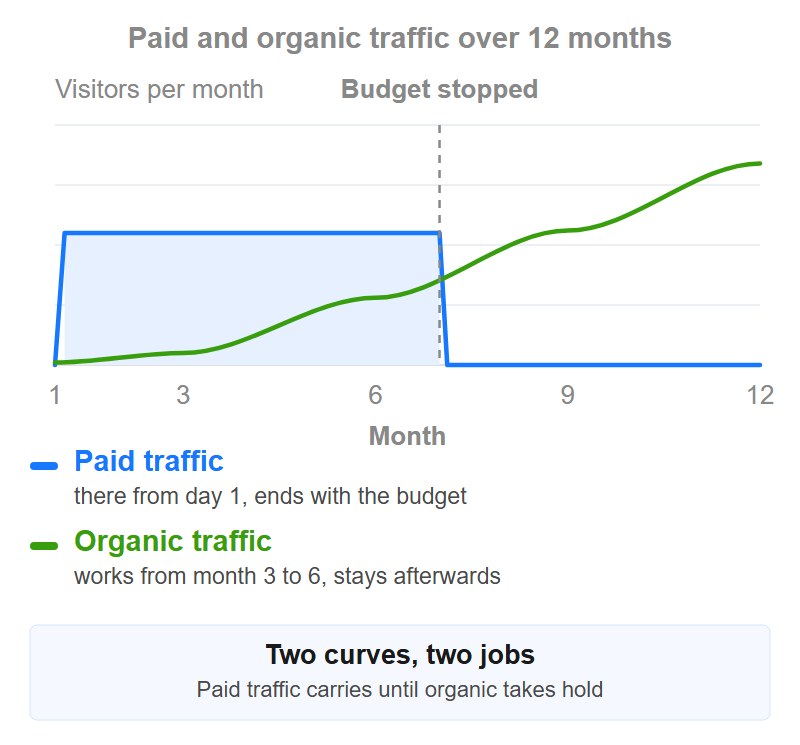
The reason you need both sits in these two curves. The blue area is paid or bought traffic: at full level from day 1, constant, and back down the day after the last euro. The green line is everything organic: almost nothing for months, then growing — and it keeps running when you stop doing anything. Betting on only one of the two means you have either no patience or no money.
Keep the two kinds cleanly apart all the same, including in your analytics. Tips 1 to 27 build reach that stays with you. Tips 28 to 30 buy time and stop working the moment the budget ends. One does not replace the other, and anyone throwing both into a single total eventually mistakes a bought spike for organic growth. How the kinds differ is in the glossary under website traffic.
The SEO groundwork in five points
Tips 1 – 5 First effect: 2 – 6 weeks
Search engine optimisation fills whole books. For a normal company, shop or blog site, though, most of the effect sits in the following five moves. Everything beyond that — long-tail strategies, link building at scale, semantic optimisation — is only worth it once these five are in place.
1. Clarify search intent and give each topic exactly one page
Google does not rank the best page but the most fitting form of answer. Open a private window, search your term and count what is on page 1: if there are eight guides and two comparison lists, your product page will not rank for it — however good it is. Conversely, no blog article wins against ten shop categories.
How to go about it: for every important term, note the dominant format (guide, list, product page, comparison, video), the average text length of the top 5 and the three sub-topics they all cover. If one of those is missing on your page, that is the first gap you close.
The second part matters more than it sounds: use the operator site:yourdomain.com plus your term to find your own pages aiming at the same topic. If you find three, those three compete with each other, split the signals, and none of them wins. Merge them into one strong page and redirect the old addresses there with a 301. One good page beats three mediocre ones — and you often notice the difference within four weeks.
2. Take your keyword set from Search Console, not from your gut
Keyword tools estimate. Google Search Console measures. It shows you up to 16 months back which search queries your pages are actually served for, how often they are clicked and what average position you hold — free of charge and for your real domain, not for an industry average.
This is how you find the fastest lever:
- Open the performance report, set the period to the last three months and sort by impressions.
- Look at all queries whose average position sits between 8 and 20.
- Pull the ten with the most impressions out of that list.
Those are terms Google already considers your page relevant for but narrowly keeps off page 1. Moving from position 11 to 7 brings you more visitors than a completely new article starting from zero — and it costs a revision instead of a new production. Just note: the data lags around two days behind, so never measure the day after a change.
Search Console does have one gap, though, and it is fundamental: it only shows terms you already appear for. For a topic you have no page on yet, you see nothing there. For that you do need a keyword tool after all — the Keyword Planner in Google Ads is enough and is free with an account, even without a running campaign.
The procedure there takes three steps: enter a broad term, filter for queries with at least three words, sort by search volume. The three-word queries are the way in — less competition, clearer intent, and they tell you word for word what headline the new page needs. Do not take the absolute volume figures at face value: those are estimates in rough ranges, additionally grouped together when no ads are running. The only reliable thing is the order relative to each other, not the number.
3. Update existing articles instead of constantly writing new ones
This is the tip almost everybody knows and almost nobody does systematically. An existing article already has age, internal links and ranking history — it does not have to start from the beginning, only to get better. That is exactly why a revision often works within two to six weeks, while a new text in a competitive topic takes months.
Take the ten pages from tip 2 and work through these points for each one:
- Update figures and years, replace outdated screenshots and dead links.
- Answer the questions from Google's "People also ask" box, as far as they belong to the topic — those are documented user questions, not gut feeling.
- Add a section the current top 3 have and you do not.
- Shorten the introduction: the answer belongs at the top, not behind three paragraphs of preamble.
Two mistakes to avoid: do not change the page's address, or you give away exactly the history you are revising for. And only move the publication date forward if the content really changed — a new date on old text brings nothing but annoyed regular readers.
4. Link internally and write titles somebody wants to click
Internal linking is the only link building you fully control yourself, and in most projects it is underdeveloped. Build one detailed main page per topic and arrange the specialised articles around it — all of them link to the main page, the main page links back. Three to five internal links per article are enough if they fit the content. What matters is the link text: "price list for window installation" tells a search engine and a reader what is coming, "click here" tells neither anything.
The second lever is in the search result itself. Position 3 with a strong snippet regularly brings more visitors than position 2 with a boring one — and a title is changed in an afternoon, a ranking is not. Write the benefit into it instead of the category, keep the title at around 60 characters and the description at 150 to 160 so Google does not cut it off. Then measure: in Search Console you see the click-through rate of the same page before and after the change — compare 28 days, not three.
5. Do the technical check once, properly
Technology rarely brings you new visitors — it makes sure the ones you worked for actually arrive. Three values count, the Core Web Vitals, and all three have clear thresholds:
| Metric | What it measures | "good" from |
|---|---|---|
| LCP | how quickly the main content is visible | 2.5 seconds or faster |
| INP | how quickly the page responds to clicks | 200 milliseconds or faster |
| CLS | how much the layout jumps around | 0.1 or below |
Measure them in PageSpeed Insights and look at the field data from real users there, not at the lab test — that one runs on a simulated connection and regularly comes out friendlier than reality. In practice the biggest gains are almost always in the same three places: oversized images without modern compression, missing width and height attributes on images (those cause the jumping) and fonts that block rendering.
Add a look at the "Pages" report in Search Console. If important addresses show "Discovered – currently not indexed" or "Crawled – currently not indexed", you do not have a ranking problem but an inclusion problem. A page that is not indexed brings exactly zero visitors, however good it is.
The second part of the technical check is structured data. It brings you no ranking — it decides what your entry looks like in the search result and whether map search and AI answers can even capture cleanly what the page is about. Four types cover almost every case:
- Article for guides and blog posts: headline, author, publication and modification date.
- Product for shop pages: price, availability, reviews — those are the stars and price figures you see on competitors in the search result.
- LocalBusiness for anything with an address: address, opening hours, phone number — written identically to tips 24 and 25.
- FAQPage for genuine question-and-answer sections, like the one further down this page.
In practice you go about it like this: JSON-LD in the head of the page, one block per page type. Most content management and shop systems generate it through an extension, you rarely have to write it by hand. Afterwards check every template once in Google's Rich Results Test and from then on the "Enhancements" report in Search Console — there you see errors on the pages you would never test individually too.
A mistake costs more here than the markup brings in: only what is also visibly on the page may be marked up. Reviews in the code that do not exist in the text are a policy violation — and that costs the display for the whole domain, not just for that one page. What else there is to do on your own page is collected under OnPage optimization.
Visibility in AI search and AI Overviews
Tips 6 – 7 First effect: 1 – 3 months
A growing share of queries ends in a summarised answer — in Google's AI Overviews, in ChatGPT, Perplexity or Gemini. For thin content that is bad: whatever a model can summarise in two sentences no longer needs a click. For sources with substance of their own it is an opportunity, because very few pages are named in these answers — and whoever is named gets qualified visitors. The technical term for this work is Generative Engine Optimization.
6. Put the answer up front and the evidence behind it
Language models pick up passages that answer a question self-containedly. In concrete terms that means: put the question as a subheading, answer it fully in the first paragraph in 40 to 60 words, and only then follow with reasoning, data, examples and caveats. Hide the answer behind three paragraphs of context and you will not be quoted — and you also lose the human readers who decide quickly.
Three further things help measurably: tables and short lists are picked up above average because their structure is unambiguous. Numbers belong in the running text and not only in a graphic, because an image cannot be quoted. And formulate clearly instead of cautiously — clear statements can be taken over, "it depends" cannot.
The frame for this is the same one Google describes in its guidance on helpful content: an identifiable author, visible experience, traceable sources. That is not a trick but the minimum requirement to be considered as a source at all.
7. Deliver something only you have
A language model can reassemble any general guide from ten other sources. What it cannot do: invent your numbers. Your own analyses, price comparisons, test results and experience from your business are the only content type that cannot be replaced — and exactly for that reason the strongest reason to name you of all people.
You do not need a research budget for it. Every company sits on data that can be analysed: average processing times, most frequent customer questions, price development of your own industry over twelve months, failure rates, material consumption, the 200 quotes you wrote last year. All that matters is that you make the collection transparent: period, sample size, method. Your own data without a statement of method reads like a claim — with one, it is quotable.
Social media and video as traffic sources in their own right
Tips 8 – 11 First effect: 4 – 8 weeks
Outside Google it is not the ranking that decides but the occasion. People click because a post concerns them, not because it is well optimised. So you work differently here: less keyword, more hook.
8. One platform properly instead of five half-heartedly
Five abandoned profiles look worse than one that is alive — they signal to every visitor that something was started here and left lying. So decide on the one channel your audience is on anyway, and serve it consistently for six months before you think about a second.
A rough allocation that holds in most cases:
- LinkedIn for business customers and professional topics.
- Instagram and TikTok for everything visual and consumer-facing.
- Facebook groups for local topics and hobbies.
- YouTube for anything that needs explaining.
- Pinterest for planning and design topics.
For the remaining profiles a well-kept description with a link is enough — claimed but not worked. And do not measure success in likes but in the channel report of your analytics. If a channel sends no visitors after 90 days of regular work, it is the wrong channel or the wrong format: consistency beats reach in the early phase, but it does not replace the right choice of platform.
9. Use video as a second search engine
On YouTube people search, not just watch, and the videos additionally appear in normal Google search. For topics that need explaining this is often the shortest route to visibility, because the competition is thinner there than in text: many specialist questions have hundreds of articles but three usable videos.
Production is the smallest problem here. A screen recording with a calm explanation is perfectly enough — people are looking for a solution there, not a glossy production. What matters more are the surrounding details:
- The search query belongs word for word in the title, not as a creative paraphrase.
- The first 30 seconds decide whether somebody stays: name the problem, show the result, then explain.
- The link to the matching subpage belongs in the first line of the description and additionally in a pinned comment.
- Set chapter markers — they create jump links in Google search.
A video that carries sends visitors for years. That is the decisive difference from a social post that is done after 48 hours.
10. Check Pinterest if your topic has something to look at
Pinterest is filed by many as a social network and therefore overlooked. In fact it is a visual search engine with planning intent: people collect things there that they want to do or buy later. For recipes, interiors, fashion, gardening, crafts, travel, weddings and DIY it is regularly the most underestimated channel.
What you have to pay attention to is manageable. The format is portrait at a ratio of 2:3, so around 1000 × 1500 pixels — square images lose in the feed. A short line of text on the image raises the click rate considerably, because otherwise it is not recognisable in the grid what it is about. And titles, descriptions and board names are searched, so they want the same terms as your page.
The big difference from other platforms: a pin builds up slowly and then runs for a long time. Reckon with six to eight weeks before anything shows, and with visitors who still arrive two years later. Give up after two weeks and you have only paid for the build-up and missed the harvest.
11. Build in cross-promotion and share buttons
Every channel you serve should point to the next one. In the video you refer to the detailed article, in the article to the video, in the newsletter to both, and in your signature to whatever is new right now. That costs no additional production, only the discipline not to forget the reference.
With share buttons, placement decides. They belong at the end of the text, not in the header — nobody shares an article they have not read yet. Limit yourself to two or three networks plus "copy link" and WhatsApp, because a bar with twelve icons is ignored and costs loading time.
So that you know afterwards what worked, append UTM parameters to every link you set yourself. Without that marking, some of your visitors end up in the statistics under "direct" — and you are optimising blind.
Using other people's reach: communities, guest posts and PR
Tips 12 – 16 First effect: days
The fastest shortcut to new visitors leads through places where your audience is already gathered. The price is always the same: you have to contribute there instead of advertising. Turn that around and you are out — permanently.
12. Be useful in communities before you link there
Forums, professional groups and Reddit communities send small but exceptionally well-matched streams of visitors: somebody arriving from a specialist discussion has already understood your topic and is looking for a solution. The conversion rates from such sources are regularly above those of search.
Access, however, is earned, not bought. First read the rules of the group in question — in many subreddits self-promotion is explicitly regulated, and a common rule of thumb is around nine helpful posts to one recommendation of your own. So answer ten questions fully without referring to yourself. After that, a link in a post where it genuinely answers the question is completely unproblematic.
Two things kill the channel instantly: the same link in several groups on the same day, and an answer that consists only of a link. Always write the answer out fully in the post and put the link underneath as further reading — credibility is the entry ticket there, and it is issued only once.
13. Answer questions on knowledge platforms
On Quora and in specialist wikis you find exactly the questions you already have articles for — often worded literally the way people type them into Google. These sites rank well themselves, so you benefit twice: from the platform's visitors and from those who come across the question through search.
The procedure is unspectacular and works anyway: search the platform for your core terms, sort by views and take on the ten most-read questions you can genuinely answer. Write a complete answer — five to ten sentences, concrete, without advertising — and put your link underneath as a source or further reading.
The appeal is in the durability: a good answer written today is still being read in three years without you doing anything. Old answers keep working long after you wrote them — unlike any social post.
14. Tap other people's reach through guest posts and podcasts
A specialist article on an established site brings you three things at once: visitors, a backlink and visibility among people who do not know you yet. The most common mistake when enquiring is to ask for permission instead of offering a topic. "May I write a guest post for you?" creates work for the recipient. Three concrete topic proposals with two sentences each and the reason why you can judge the matter take work off their hands.
Clarify two points before writing: whether the link sits in the author box or in the text, and whether it is set without nofollow. Both are negotiable but difficult after the fact. And do not link to the home page but to the subpage that matches the guest post's topic — that is where the visitor belongs, and that is where the link works.
Podcast appearances work on the same principle but cost you only an hour of conversation instead of a written article. Approach specialist podcasts with a small, clearly defined audience rather than the big ones: the drop-off rate is lower there, and the episode stays available for years.
15. Do PR, even without an agency
Trade media and regional newspapers are constantly looking for topics and experts who can put something in context — this demand is greater than most companies believe. You do not need an agency for it, you need a genuine occasion: an analysis of your own, a new offer with substance, an assessment of an industry change, a regional event, an unusual number from your business.
A usable release fits on one page. The first paragraph answers who, what, when and why this is relevant to the outlet's readership — not to you. After that follow two or three paragraphs of background, a quote with a name and role, and a contact. Send it to free portals and, more importantly, specifically to five to ten editors you have researched by name who write about your topic.
Do not expect marketing-style hit rates: if one out of ten approaches is picked up, it was a good send-out. One media report brings you visitors and a link from a source you could never buy — and it is often picked up by further sites.
16. Cooperate with topic-adjacent sites rather than competitors
The trick is to find partners with the same audience but without a competing offer. A tax adviser and an accounting software, a photographer and a wedding venue, a bike shop and a tour portal: both address the same people and take nothing away from each other.
Proven formats, from the smallest effort upwards: a mutual mention in the newsletter, a joint guide both promote, a webinar for two, a package offer. Start with the newsletter swap — it costs half an hour and shows you immediately whether the audiences really match.
Agree two things beforehand: who publishes what and when, and which UTM parameters are used for the links. Without that agreement, nobody knows afterwards who sent whom how many visitors — and a good first round never becomes a second. Cooperations cost time instead of budget, but they need commitment.
Content that gets shared and linked
Tips 17 – 19 First effect: 2 – 8 weeks
A good text gets read. A tool, a number or an award gets passed on — and passing on is what multiplies visitor numbers instead of letting them grow linearly. These three formats are the most reliable triggers for it.
17. Publish a small study of your own
Journalists, bloggers and trade media quote figures, not opinions. And nobody expects a representative survey from you: a clean analysis of 200 data points from your own environment is more than most market participants can show.
Possible bases that exist in almost every business: the prices of 100 competitors over twelve months, the 50 most frequent customer questions and their distribution, processing or delivery times across the year, failure and complaint rates, the analysis of a short customer survey with five questions.
For that to turn into links, you need three additions: a clear statement of method (period, sample, type of collection), a graphic that can be taken into an article without reworking, and the raw data as a table on the same page. Then you send the analysis to the editors from tip 15. A study that is quoted once is usually quoted repeatedly — the second mention almost always comes out of the first.
18. Provide a tool, not another PDF
A calculator, a checklist to tick off, a fillable template: such pages are saved, shared and linked because they take work off the visitor instead of creating it. Another whitepaper does not.
The effort is smaller than many think. A cost calculator is a formula with three input fields. A template is a cleanly formatted table. A checklist is a list with boxes and a print view. What is decisive is that the result is visible immediately — anyone who first has to enter an email address before anything happens drops off at a rate of 80 percent and never links.
You collect the address afterwards: show the result, and underneath "save as PDF" or "send me the result". Also link the tool from every thematically matching article — most calculators do not die of poor quality but of the fact that nobody learns they exist.
19. Award a ranking or a prize
Whoever turns up in your "top 20 of …" links and shares it almost always of their own accord — without you having to ask. That is one of the few cases where others advertise for you voluntarily, and it works in practically every industry: best tools, best regional providers, most helpful specialist blogs, nicest projects of the year.
For it to carry, the selection has to be comprehensible. Publish the criteria openly, name the data basis and explain why somebody is on the list. A list without a recognisable method is read as advertising and not shared.
Two details raise the effect considerably: provide a small badge to embed that links back to your list page, and inform everyone named personally with a short email. And repeat the whole thing annually — from the second year on, the list becomes a search term in itself, and those named wait for it.
Direct channels: visitors who come back on their own
Tips 20 – 23 First effect: immediately to 4 weeks
Reach on platforms is borrowed. A mailing list belongs to you and stays yours even when an algorithm changes overnight. That is why email, for all the obituaries, is the channel with the most stable response — and the only one where you decide yourself when your visitors come back.
20. Collect addresses with a reason, not with a checkbox
"Subscribe to the newsletter" convinces nobody, because it names no benefit. A checklist, a monthly analysis, a discount on the first order or advance notice of free appointments do. So spell out what is in it and how often it comes — "once a month, five minutes to read, unsubscribe any time" answers the three questions that make everyone hesitate.
Placement matters too. A field at the end of an article that has just covered the topic converts many times better than a form in the sidebar that looks the same on every page. A discreet prompt on leaving the page is defensible; a layer that covers everything after three seconds costs you readers and ranking.
Formally, in Germany double opt-in counts as the safe route: sign-up, confirmation email, dispatch only afterwards. It costs you around 10 to 20 percent of sign-ups and saves you legal risk and dead entries. Incidentally, the confirmation email is the most-opened email you will ever send — put a useful link in it instead of an empty "thank you".
21. Let automated email flows work for you
Written once, they run permanently — that is the whole point. While a newsletter means work every week, automated flows bring visitors back without you doing anything. Three flows cover most of it:
- Welcome series, three emails over ten days: what sets you apart, your best content, one concrete offer. It is opened far more often than later emails because the interest is fresh.
- Abandoned cart for shops, staggered at roughly one hour, 24 hours and three days. The first email reminds, the second answers objections, the third gives a reason.
- After the purchase: instructions, care advice, matching accessories, a request for a review. That generates repeat visits and, along the way, the reviews from tip 25.
Put UTM parameters in every link, otherwise the returners show up in your statistics as direct visits. And check every flow once a quarter for dead links and outdated prices — nothing looks less serious than an automated email leading to a 404 page.
22. Reactivate contacts you have had all along
The cheapest visitors are the ones who already know you. Old customer lists, enquiries without a sale, subscribers who have not opened anything for a year: these people have already cleared the hardest hurdle — trust.
Go about it in this order. First, segment: by last activity, by product group bought, by enquiry topic. Second, write one email per segment that picks up exactly that situation instead of sending everyone the same thing — fewer recipients per email almost always leads to more clicks overall. Third, address the inactive ones directly once: "Do you still want to hear from us?" with two buttons. Whoever does not respond comes off the list.
Removing people feels wrong but noticeably improves your deliverability, because mailbox providers look at open rates. Check beforehand whether valid consent exists for the list in question — different rules apply to existing customers than to bought addresses, and the latter you should not touch anyway. Relevance is the difference between a newsletter and junk.
23. Sponsor somebody else's newsletter
The most overlooked paid channel. A slot in a specialist author's newsletter reaches an audience that reads voluntarily and trusts the sender — neither applies to ads in a feed. For small specialist lists you often pay less than for a week of social ads.
Approach authors whose list is between 1,000 and 20,000 subscribers: big enough for an effect, small enough to be open to negotiation. Before booking, ask for three figures — subscriber count, average open rate and an example of an earlier placement. Open rates below 25 percent are a warning sign, above 40 percent a very good one.
Always book one issue first, tag the link with UTM parameters and send readers to a page that matches the newsletter's topic exactly — not to the home page. Only once that single placement has paid for itself do you negotiate a series.
Directories, maps and offline routes
Tips 24 – 27 First effect: 1 – 4 weeks
A large share of search traffic today no longer runs through classic result lists at all but through maps, directories and review portals. And a small but especially loyal share comes from the real world — where nobody competes with you for visibility.
24. Look after your profile in map search
For local providers, the Google Business Profile is frequently the strongest single source of all — stronger than your own website. It costs nothing and you write not a line of text for it.
The points that really move something, in this order: choose the primary category exactly, because it decides more than any other field which searches you appear for. After that, real photos instead of stock material, correct and maintained opening hours including public holidays, services entered individually, and the most frequent questions answered by you in the question-and-answer section before somebody else does.
Reviews are the second lever: ask for one after every completed job and answer every review, including the bad ones — factually, briefly, without justifying yourself. And append UTM parameters to the website link in the profile, otherwise you will never see in your statistics how much this channel actually brings.
25. Get listed in directories and review portals
Trade directories, specialist registers, comparison and review portals rank for terms you will realistically never rank for yourself — "providers for X in Y" mostly belongs to them. An entry takes ten minutes and then works for years.
Sensible starting points alongside Google: Bing Places, Apple Business Connect (relevant for all map apps on iPhones), the two or three largest national business directories in your market, the two to three biggest specialist directories in your industry, plus the review portals your customers actually look at. Twenty well-kept entries are worth more than two hundred automatically generated ones.
The decisive point is consistency: company name, address and phone number have to be written identically everywhere — the same legal form, the same spelling of the street, the same number formatting. Deviations lead search engines to suspect several companies and to trust none of them properly. Put the details in a file once and copy from there.
26. Print QR codes on everything you print anyway
Invoice, delivery note, packaging, business card, vehicle livery, display stand, menu: a code leading to a matching page costs not a cent extra, because the paper is printed anyway. These visitors are also people who have already held you in their hands — nobody competes for them.
Three rules decide between success and uselessness. Use dynamic codes whose target you can change afterwards, otherwise a mistake in 5,000 printed flyers is uncorrectable. Lead the code to a page that matches the context — from the delivery note to the assembly instructions, not to the home page. And label it: "watch the assembly video" gets scanned, a bare code does not.
On size, the rule of thumb is that the edge length should be around a tenth of the reading distance — so for a sticker on a vehicle scanned from two metres, around 20 centimetres. Append UTM parameters to the target and you even see in your statistics which sticker works and which does not.
27. Let others sell for you
An affiliate programme turns bloggers, comparison sites and satisfied customers into sales partners who advertise for you at their own risk. You only pay when something happens — which makes it the only channel where you do not tie up your budget in advance.
You have to make three decisions: the commission (depending on margin, 5 to 30 percent of net revenue or a fixed amount per sale is common), the cookie lifetime (30 days is standard) and the technical route. For small shops an extension to the shop system is usually enough; for larger programmes a network that handles billing and fraud checking makes sense.
The start rarely happens on its own. Approach the 20 people directly who already write about you or buy from you, and hand them finished materials: text modules, images, a personal link. And work out beforehand whether your margin carries the commission — an affiliate programme with too tight a calculation brings revenue and costs profit.
Using paid traffic and bought website traffic properly
Tips 28 – 30 First effect: immediately
Paid traffic replaces none of the measures so far. It buys you time while everything else is still ramping up — and it makes tests possible that you would otherwise wait months of data for. That is exactly how you should treat it: as a tool with a clear purpose, not as a permanent solution.
28. Use ads for tests, not as a permanent solution
For small budgets, the real value of paid ads is not in revenue but in the speed of the insight. Organically you need months to know which headline pulls. With €200 and two weeks you know it now.
This is how you set the test up: the same landing page, three clearly different headlines, the same budget, a run time of at least 14 days so weekdays even out. Afterwards you take the winner and carry it over to your page title, your meta description and your newsletter subject line. You can repeat the same setup for offers, price presentations and landing pages.
Two traps are common: budgets that are too small deliver numbers that only look like results — below around 100 clicks per variant the difference is usually noise. And anyone sending people to the home page instead of a matching subpage is not measuring the ad but the visitors' disorientation. How paid and organic routes complement each other in detail we compared in organic traffic vs. paid traffic.
29. Buy website traffic to build up user signals and statistics
A new page without visitors delivers you no data: no bounce rate, no time on page, no click paths — and therefore no basis for any optimisation at all. You can neither test nor see where people drop out, because quite simply nobody is there. That is exactly the gap bought traffic closes while the slow channels get going.
At eBesucher you book that plannably and without a contract. The surfbar displays your page fully loaded — including all content and design elements — while click campaigns fetch deliberate views. You set the dwell time per visit yourself, as well as the geo-targeting with which you narrow down to German-speaking countries or other markets. Quality is validated independently by AdScore.
30. Choose the traffic to match your type of site
An online shop needs different signals from a blog, an agency different ones from an affiliate site. Treat them as the same and you get numbers that look good in the dashboard and do nothing else.
For these cases there are separate entry points with matching settings: online shops, bloggers, agencies and affiliates. Fit decides whether bought traffic is useful to you or merely inflates the statistics.
Frequently asked questions about increasing website traffic
How long does it take to increase website traffic?
That depends entirely on the channel. Communities, guest posts, PR and directory entries work within days. Revised pages take two to six weeks before the position shifts. New content in competitive topics takes three to nine months, Pinterest around six to eight weeks until the first movement. Paid or bought traffic works immediately but ends with the budget. A sensible mix therefore combines at least one fast channel with one slow one.
Can I increase my website traffic for free?
Yes, and with a large part of this list: communities, knowledge platforms, guest posts, PR, directories, map profile, cooperations, internal linking and revised articles cost no money. They cost time — and not a little. In practice, free means paid for with working hours, and you should do that sum honestly: if three hours of community work a week costs you more elsewhere than a paid placement costs, the paid variant is the cheaper one.
Which traffic source pays off fastest?
For local providers, the profile in map search — a single correctly set category there often decides double-digit growth. For specialist topics it is communities and guest posts, for visual topics Pinterest and video, for shops the automated email flows. Search engine optimisation is the slowest of the sources named and still the most important in the long run, because it is the only one that keeps running without ongoing effort.
Does bought traffic harm my ranking?
Views on your page are not a direct ranking factor, and visits through a third-party provider are not a policy violation. It becomes problematic somewhere else: when traffic serves to deceive advertising partners, investors or customers about actual demand. So use it as a supplement for statistics, user signals and the start-up phase — and not as a substitute for content people look for voluntarily.
How do I know a measure really worked?
By the source, not by the total. Look at the channel group report, tag every link you set yourself with UTM parameters and compare periods of equal length — 28 days against the 28 before, not one week against a weekend. And watch engagement rather than plain views: in GA4 a session counts as an engaged session if it lasts longer than ten seconds, includes at least two page views or triggers a key event. The engagement rate therefore tells you considerably more about the quality of a source than its visitor count.
Start with three tips, not with thirty
Starting thirty measures at once reliably leads to none of them being finished. Instead, pick one tip from the SEO groundwork, one from other people's reach and one from the direct channels, and implement exactly those three over the next 30 days.
Then measure what worked and choose the next three. Which metrics carry and which only look good is in our article on marketing KPIs; why dwell time reveals particularly much is in the matching article. That is how a long list turns into a work plan.
If your page first needs visitors at all for statistics and user signals to say anything, you can book that part with us — from a few euros, without a contract and with adjustable geo-targeting. An overview for site owners is at traffic for website owners.
Good luck with the implementation!
Your eBesucher team
Related


0 Comments
Sign in to leave a comment.
Sign in