
The surfbar stays empty even though everything is set up correctly?
Your ad blocker is off, no VPN is running, you are on a normal home internet connection - and still the surfbar stays empty or the connection test refuses to go through. Surprisingly often the cause is a setting most people have never heard of: the DNS server.
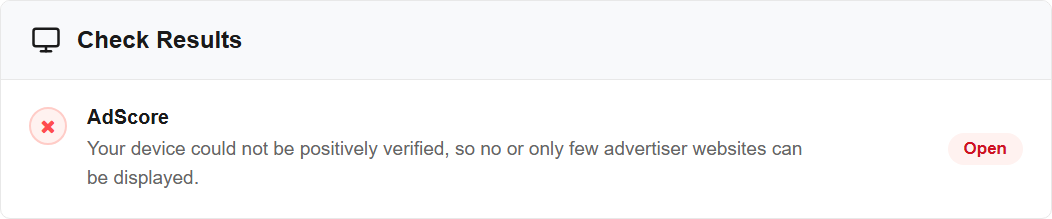
This is what it looks like in the diagnosis: AdScore is marked Open. If that is the box in front of you, you are in the right place.
The good news: this takes two minutes to change, and you need no technical background. This guide walks you through it step by step for Firefox, Google Chrome and Microsoft Edge.
What is a DNS server?
Picture the internet as one enormous phone book.
You type in ebesucher.com - a name you can remember. Computers cannot do anything with names, they need a number. The DNS server is the phone book that looks up the name and hands back the number. Only then can the page load.
You never picked this phone book yourself. Normally your device simply uses the one your internet provider hands it.
Why would a DNS server slow the surfbar down?
Some phone books have pages torn out of them.
Many DNS servers maintain so-called filter lists - a kind of ad blocker that does not sit in your browser but in the network. If an address is on such a list, your device simply gets no number for it. As far as you are concerned, that address does not exist.
And this is exactly where it becomes a problem for the surfbar. Before the surfbar and the click campaigns start, our connection test runs. Part of that check is loaded from an external address, and that address is on many filter lists. The result:
- The check cannot be loaded.
- No result reaches us.
- Without a result we cannot assign any campaigns to you.
This is the decisive point, and it is often misunderstood: we are not classifying you as suspicious. We get no answer at all - and no answer is treated by the system exactly like a failed check. That is why you see an empty surfbar even though there is nothing wrong with your connection.
Where does such a filter come from if I never set one up?
In the vast majority of cases somebody else switched it on for you. Typical sources:
- Your internet provider. Many contracts include a "security package", a "parental control" option or something called "ad-free browsing". Those are DNS filters.
- Your mobile carrier. Mobile networks often run extras with names like "Ad Blocker" or "Safe Surf".
- Your router. Fritz!Box and similar devices ship with parental controls and ad filters that apply to every device in the household.
- A deliberately configured filtering DNS. Services such as AdGuard DNS, NextDNS, ControlD or a Pi-hole on your own network block exactly these addresses. That is their purpose - it just does not fit here.
- The "Private DNS" setting on an Android phone. People set it up once and then forget about it. It takes precedence over anything you configure in the browser.
- A block put in place by your provider. In some countries providers block entire sites. In that case eBesucher will not open at all. A different DNS server solves that too.
Which DNS server should I pick?
Most likely one that brings no filter lists along. These two are free, well known and worth a try:
| Provider | Shown in the browser as | Classic addresses |
|---|---|---|
| Cloudflare | Cloudflare (1.1.1.1) | 1.1.1.1 and 1.0.0.1 |
| Google Public DNS | Google (Public DNS) | 8.8.8.8 and 8.8.4.4 |
Which of them helps in your case is quickest to find out by trying. Set one, reload eBesucher and see whether the surfbar shows pages again. If it does not, try the other one. Each switch takes less than a minute and can be undone at any time.
Cloudflare is a good place to start, because it is offered directly in the dropdown of all three browsers.
A note on the filtering variants: "Cloudflare for Families", "AdGuard DNS", "CleanBrowsing" and NextDNS with blocklists enabled bring along exactly the lists described further up. In our experience those are the candidates where things get stuck. If one of them is configured on your device, it is worth trying one of the two from the table instead.
Firefox: changing the DNS
On a computer
- Click the menu at the top right (the three horizontal bars ☰).
- Choose Settings.
- Click Privacy & Security on the left.
- Scroll all the way down to the DNS over HTTPS section.
- Choose Increased Protection. Depending on your Firefox version the option may simply read "Enable DNS over HTTPS".
- Pick Cloudflare as the provider.
The change takes effect immediately. There is no need to restart Firefox. Close the settings tab and reload eBesucher.
On an Android phone
- Tap the menu (the three dots ⋮).
- Tap Settings.
- Scroll to the Privacy and security section and tap DNS over HTTPS.
- Choose Increased Protection and Cloudflare as the provider.
Worth knowing: this setting applies to Firefox only. Other apps and programs on the device keep using the old DNS server. For the surfbar inside Firefox that is enough - if you also run the surfbar in other browsers or through the eBesucher Addon, it is better to change the DNS for the whole device right away (see further down).
Google Chrome: changing the DNS
On a computer
- Click the menu at the top right (the three dots ⋮).
- Choose Settings.
- Click Privacy and security on the left, then Security.
- Scroll down to Use secure DNS and switch it on.
- Below it pick the With: option and choose Cloudflare (1.1.1.1) from the list.
If the switch is greyed out with a note about your organisation managing the setting, then the browser is not the one deciding - the operating system or an administrator is. In that case change the DNS for the whole device (see further down).
On an Android phone
- Tap the menu (the three dots ⋮) and then Settings.
- Tap Privacy and security.
- Tap Use secure DNS and choose Cloudflare (1.1.1.1).
Microsoft Edge: changing the DNS
- Click the menu at the top right (the three dots ⋯).
- Choose Settings.
- Click Privacy, search, and services on the left.
- Scroll down to the Security section.
- Switch Use secure DNS to specify how to look up the network address for websites on.
- Choose Choose a service provider and pick Cloudflare (1.1.1.1) from the list.
When the browser alone is not enough
The browser setting is sometimes overruled - by the operating system, by the router or by the mobile network. In that case change the DNS server one level deeper.
Windows 11 and Windows 10
- Open Settings (Windows key, then the gear icon).
- Go to Network & internet.
- Pick Wi-Fi or Ethernet, depending on how you are connected, and open the properties of your connection.
- Find DNS server assignment and click Edit next to it.
- Switch from Automatic (DHCP) to Manual.
- Turn IPv4 on.
- Enter
1.1.1.1under Preferred DNS and1.0.0.1under Alternate DNS. - Click Save.
Android: the "Private DNS" setting
This setting takes precedence over every browser. If a filtering provider is configured here, it is often the real cause.
- Open the phone's Settings.
- Go to Network & internet, on Samsung devices Connections.
- Tap Private DNS. On some devices the entry sits under More connection settings.
- Choose Private DNS provider hostname and enter
one.one.one.one. - Tap Save.
If something like dns.adguard.com or a similar filtering service is in there, you have found your cause.
In the router
Change the DNS server in the router and it applies to every device in the household - televisions and game consoles included. On a Fritz!Box you will find it under Internet, Account Information, tab DNS Server. While you are there, check whether parental controls or an ad filter are active and exclude your device from them.
If you are unsure: leave the router alone and change the DNS in Windows or in the browser instead. Nothing there can break.
After the change: trigger a new connection test
The result of the last test is stored for a few hours. To have it checked again right away instead of waiting for it to expire:
- Delete the cookies for eBesucher. In all three browsers you do this through the padlock icon on the left of the address bar, where you will find the option to clear cookies and site data.
- Reload the page and log in again.
- Start the surfbar. The connection test now runs from scratch.
Still not working?
Then the DNS server is not the cause. Work through these points:
- Switch off the ad blocker in your browser. How to do that, and which browser settings matter, is covered in Why are the surfbar and clicks not working?
- Switch off VPN and proxy. The full list of things the connection test looks at is in What is AdScore and how do I pass the connection test?
- Check your antivirus program. Some suites filter your internet traffic and end up blocking the same things a DNS filter would. Switch off web filtering or HTTPS scanning as a test.
- Update your browser and restart it completely once.
If none of that helps, write to our support team. Please mention these four things, it will speed things up:
- Your internet or mobile provider
- Which DNS server you configured
- Which browser you use, including its version
- Whether you are browsing on a computer or on a phone
In short
| Question | Answer |
|---|---|
| What is DNS? | The phone book of the internet - it turns names into numbers |
| Why is that a problem? | Filter lists in the DNS block part of our check |
| What happens then? | We get no result, and without a result there are no campaigns |
| What should I configure? | Try Cloudflare or Google Public DNS, both without filters |
| Where do I configure it? | In the settings of Firefox, Chrome or Edge |
| And if that is not enough? | In Windows, under "Private DNS" on Android, or in the router |
| What afterwards? | Delete the eBesucher cookies so a new check runs |

