
What is NoScript?
NoScript is a free browser extension under the GNU GPLv2 license. NoScript exists for Mozilla Firefox, but not for Google Chrome. The add-on blocks important elements of a website and prevents them from being executed. When using NoScript, severe display errors often occur. JavaScript in particular must be mentioned here. JavaScript is an HTML programming language that is an important part of many websites, and its code is blocked by NoScript. Anyone using NoScript cannot visit many websites at all or only with limited functionality. The page content cannot be displayed.
Since when has NoScript been around?
NoScript has been around since May 13, 2005, and was developed by Giorgio Maone. NoScript is written in JavaScript, XUL, and CSS. To date, the addon has been translated into several dozen languages. Starting with Firefox version 57, the WebExtensions API was introduced. From version 10 onwards, NoScript uses this programming interface. NoScript is also available through the Tor Browser.
Why must NoScript be deactivated?
Our main concern is the protection of those users who actively surf. Users who run all applications fairly, don't block pages, and advertise on eBesucher. Anyone who wants to use the click ads, the surfbar, or the mail service must deactivate the NoScript extension. It is not enough to adjust settings or allow exceptions. Whitelists do not work.
NoScript on eBesucher
Websites defined as "untrusted" cannot be executed. Generating views in the Surfbar or visiting Click Ads is only possible when NoScript is completely deactivated. Anyone who still uses NoScript cannot surf properly and blocks important scripts. This is irregular behavior and can lead to account suspension.
The NoScript addon for Mozilla Firefox must be deactivated for the following reasons:
- Many websites are loaded incorrectly or not at all.
- Loading JavaScript is prevented. This causes core functions of a website (Flash, scripts, etc.) to be lost.
- Important features cannot start.
How do I deactivate NoScript?
To deactivate NoScript in the Mozilla Firefox browser, open Firefox, go to the menu, and click on Add-ons.
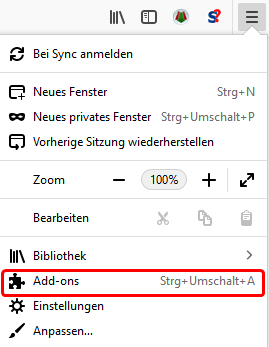
A list of all installed add-ons will be displayed. Find the NoScript addon and click Remove.

Restart the Firefox browser to complete the uninstallation.
Alternatives to NoScript
The NoScript extension does not exist for Google Chrome. There are other ways to protect yourself from internet threats. In particular, we recommend using an up-to-date antivirus program — if possible, a professional solution such as Kaspersky or Norton Antivirus rather than freeware, which presumably offers less protection.

