
eBesucher Tasks: Complete Tasks and Earn Money
Alongside the surfbar and the click ads, there is now a third way to earn on eBesucher: Tasks. You search on Google for a given term, click the advertiser's page in the list of results and then spend a short time engaging with it. For that, BTP are credited to you directly.
For advertisers, something arises here that did not exist on eBesucher in this form before: a visitor who arrives at the page via the Google search and who demonstrably looks around there.
For Users
Earn More per Action than with a Single Surfbar View
The surfbar runs along in the foreground and collects points over time. A task works differently: you complete it yourself, in a few minutes – and get considerably more for it than for a single surfbar view.
The points are credited immediately after the check – no waiting time, no manual approval. You can see your task earnings itemised separately under Earn money > Statistics > Tasks remuneration in BTP (statistics graph dropdown).
This Is How a Task Works
Search for the Page
You open Google and enter the search term shown on the campaign card. Then you scroll calmly through the list of results.
Click the Search Result
You find the advertiser's page in the results and click it there. The hit has to come from the Google search – calling up the landing page directly does not count.
Visit the Page Actively
On the landing page you stay active. The standard is 75 seconds, adjustable between 15 and 180. During this time you scroll and open at least one subpage. The page stays visible in the foreground.
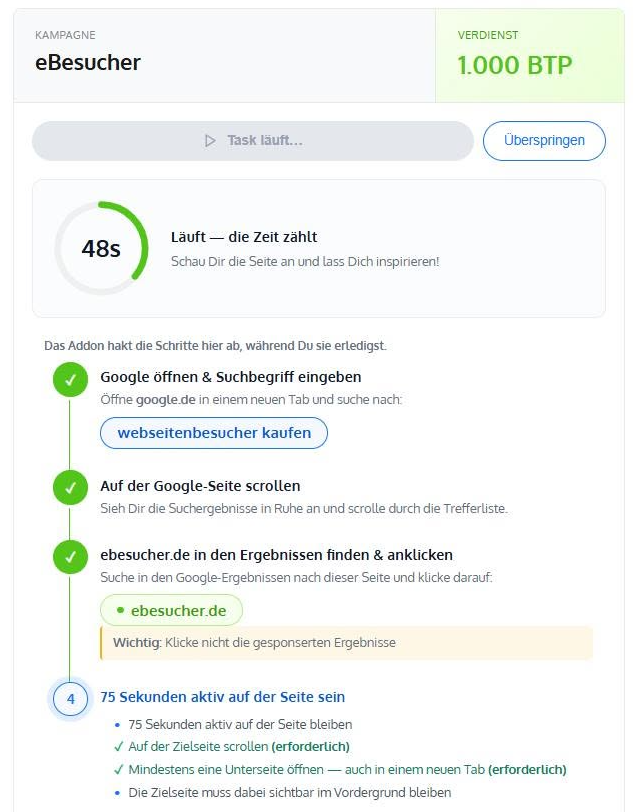
You have five minutes for one run. Only one task at a time can be open. If a campaign does not suit you, you hide it with Skip.
This Is What You Need for It
- The installed eBesucher addon, which guides you through the steps and creates the proof – on a smartphone in a browser that allows extensions.
- A valid connection test. It runs automatically in the surfbar.
- An internet connection from Germany, Austria or Switzerland – what counts is the IP address, not the country in the profile.
Your Referrals Pay into Tasks as Well
If a member you have referred solves a task, you get 8 per cent of their remuneration, and 5 per cent on the second level. This commission is paid out of the margin – nothing is deducted from the person who solved the task.
For Advertisers
Task Traffic: Visitors Who Arrive via the Google Search
A direct page view says little about whether someone is interested in your offer. With a task it is different: the user actively searches for your keyword, finds your page in the list of results and decides in favour of it there.
Every run is accompanied and checked by the eBesucher addon. It observes the search, follows the click on your result, measures the dwell time and creates a proof image. Only after that is the completion recorded.
What the User Does on Your Page
- They reach it via a hit in the Google search – a direct visit does not count.
- They observe the retention time you have set (15 to 180 seconds, standard 75).
- They scroll on the landing page.
- They open at least one subpage.
- Your page stays visible in the foreground throughout.
The addon confirms cookie notices on behalf of the user, so that the process does not get stuck on them.
Creating a Campaign in Three Steps
Open Campaign Management
You go to Visitors > Manage campaigns and click on Create new campaign. There you choose the Tasks tab.
Enter the Target and the Search Terms
You enter the target URL and up to five search terms. With each task, one of them is selected at random – this way you spread one campaign over several keywords without having to create it several times.
Set the Delivery Rate
With tasks per hour you control how many completions your campaign delivers per hour at most. Possible values are 1 to 12, the default is 2. You can change this at any time.
Important: your page has to be in the Google top 10 for every search term. Otherwise the user will not find it in the list of results and the task would be unsolvable – campaigns like that are rejected.
What a Task Costs
A task has a fixed price in BTP, which is set when the campaign is created. Currently it is 5,000 BTP per completion.
Billing takes place exclusively per successfully completed and verified task. You pay nothing for runs that are aborted or not passed. Every completion is recorded with the time, the user, the search term used and a proof image.
Good luck trying it out!
Your eBesucher team


0 Comments
Sign in to leave a comment.
Sign in