
Earn More with Surflinks: Collect Points Without Limit
You would like to earn more with eBesucher – without investing more of your own time? Then surflinks are your strongest tool. With surflinks you can let other people surf for you, and all the points earned land directly in your account.
You can create an unlimited number of surflinks. There is no limit – neither on the number of links nor on the points you can earn. All the points you collect can be paid out at any time via the payout page.
This Is How Surflinks Work
Every surflink is an individual URL that you can pass on to other people. The principle is simple:
|
📤
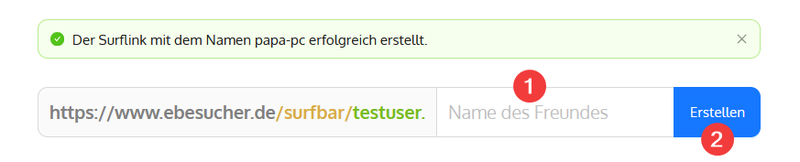
2. Share the linkSend the link to family, friends or acquaintances – by WhatsApp, e-mail or chat. |
💰
3. Collect pointsYour helper surfs – all the points land automatically in your account. |
The person who surfs via your surflink does not have to register with eBesucher. No account of their own, no sign-up – simply open the link and start surfing.
Via the surfoptions page, every surflink user can see at any time how many points they have already collected and which websites have been visited. You simply activate the sharing function in the surflink settings – your helper then receives a personal link to their statistics.
Surfbar and Click Ads – Earning Twice Over
Surflinks work with both of eBesucher's earning options. Depending on what suits your helper better:
|
🌐 Surfbar
|
🖱 Click ads
|
You decide per surflink which strategy fits best. In the surflink options you can set the priority slider between „entertainment" and „bonus". At „100% bonus", advertisements are shown with priority – that brings the most points per hour.
Who Can Surf for You? Practical Examples
Surflinks are suitable for anyone with an internet-capable device – including everyone who only has a smartphone. Here are some concrete examples from everyday life:
| 👨 |
Your father Your father enjoys discovering new things on the net? The surfbar shows him a varied selection of websites – and you collect points in the process. One tab in the browser is enough, the surfbar takes care of the rest automatically. Surflink name: Dad-PC
|
| 👵 |
Your grandmother Grandma has time and enjoys a bit of variety? The surfbar shows exciting websites on her tablet – like a little window onto the world. You set everything up once, send the link by WhatsApp – done. Surflink name: Grandma-Tablet
|
| 🤝 |
Your best friend Your friend still owes you one? Then this is their chance: open the link, let a browser tab run – done. No sign-up, no installation. A small favour with a big effect on your points account. Surflink name: Max-Laptop
|
| 🏠 |
Your flatmate You share the flat – so why not share the points as well? Lisa is online anyway, one extra browser tab is hardly noticeable. Once set up, the surfbar collects in the background all by itself. Surflink name: Flat-Lisa
|
| 💼 |
Acquaintances and colleagues Simply mention eBesucher at your next get-together or in a chat. Many people do not know the principle yet – and are surprised at how simple it is. For each person you create a separate surflink and keep a full overview in your surflinks overview. |
No Limits: Scale Up Your Income
|
10 active surflinks |
× |
8h per day |
= |
80h of surfing time daily |
All the points go into your account – and can be paid out at any time.
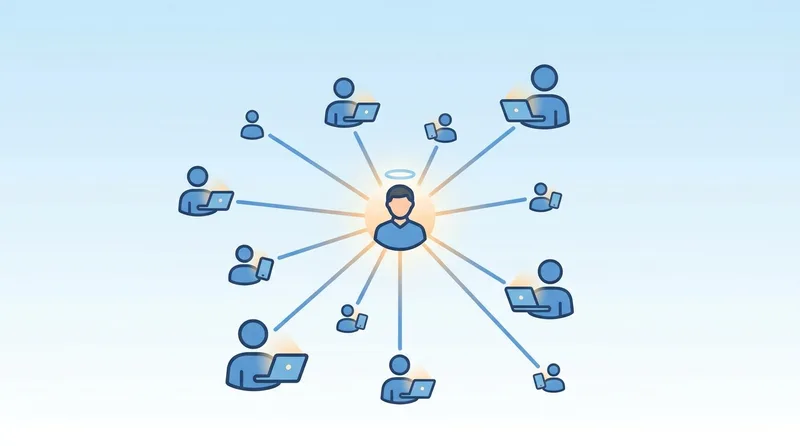
What is special about surflinks: there is no upper limit. You can create 5, 50 or 500 surflinks – the system sets you no limit. Every new surflink is a further source of income. The bigger your network, the more you can potentially earn.
5 Tips for Earning Even More with Surflinks
| 1 |
Create a separate surflink for each person. That way you see in your surflinks overview exactly who is contributing how much – and you can follow up if a link goes inactive. |
| 2 |
Activate the surfoptions page. Your helpers receive their own page with their statistics and can adjust their surfbar settings themselves. That creates trust and motivation. |
| 3 |
Set the priority to maximum points. In the surflink options, move the slider to „100% bonus". Advertisements are then shown with priority – more points per hour. |
| 4 |
Use every device around you. Laptops, tablets or PCs – whether at family, at friends' or in a shared flat: every device with a browser can collect points for you around the clock. Just ask around – you will be surprised how quickly your network grows. |
| 5 |
Extend your network regularly. Every new surflink is an additional channel. Ask neighbours, former colleagues or club members. The more people take part, the faster your balance grows. |
This Is How You Start in 3 Steps
|
||
 |
||
|
Do you have questions about surflinks? Take a look at our FAQ or contact our support team.
Good luck building your network!
Your eBesucher team


0 Comments
Sign in to leave a comment.
Sign in