
Chrome Addon: The Surfbar Starts Automatically When the Browser Starts
Do you know the feeling? You start your browser and forget to start the surfbar manually. You have to open the addon by hand in order to start the surfbar from there. In Chrome that is easier now!
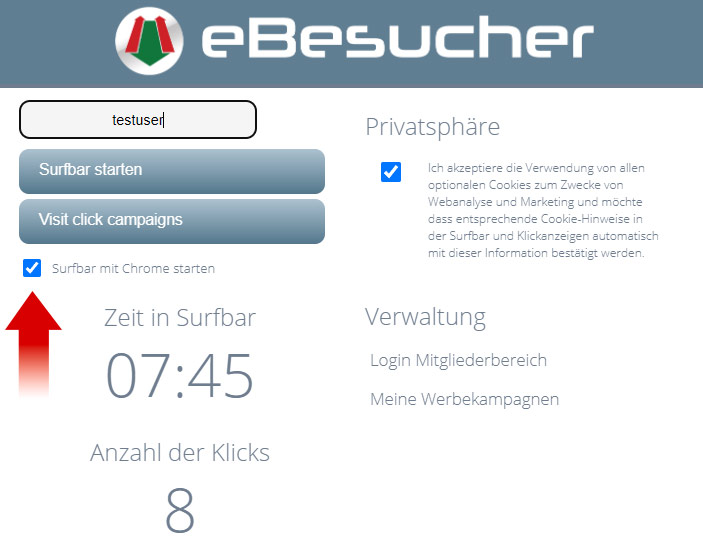
From version 3.0.77 of the eBesucher Chrome addon, the surfbar starts automatically as soon as you open your browser. You no longer have to start anything manually – simply activate the function once and from then on you earn points from the very first moment.
Activating the Surfbar Autostart in the Chrome Addon
Setting it up takes only a few seconds:
|
||
|
||
|
Collecting More Points with the Surfbar at Browser Start
Many of our users let the surfbar run while they work, study or are out and about on the net. Up to now you had to start the surfbar manually via the addon after every restart of the browser or the PC. That often meant that valuable surfing time was lost.
With the new function that no longer happens. As soon as Chrome is opened, the addon automatically checks whether the option is activated – and starts the surfbar immediately. You earn points without having to make a single click.
Restart the PC, open Chrome – the surfbar is already running. No more forgotten starts, no more lost points. Especially useful if you restart your computer daily or close Chrome regularly. All the points you collect can be paid out at any time via the payout page.
You have not installed the eBesucher Chrome addon yet? On the addon page you will find the current version for Chrome and Firefox. On a smartphone there is no Chrome addon – which mobile browsers allow extensions instead is shown in our browser comparison for Android. If you do not have an account yet, you can register free of charge and get going straight away.
Autostart for the Firefox Addon Too?
The autostart function is currently available in the Chrome addon and is coming soon for Edge as well. We are considering bringing this feature to the Firefox addon too. But for that we need your feedback:
Do you use the eBesucher addon in Firefox and would you like an autostart function there as well? Write to us via the contact form or reply directly to this newsletter. Your feedback helps us prioritise the right features.
We look forward to hearing from you!
Your eBesucher team


0 Comments
Sign in to leave a comment.
Sign in