
The eBesucher API allows you to retrieve earning statistics from the Surfbar and the Paid-to-click ads. Retrieving data does not require logging into the member area. The API can be used with any programming language. The following guide contains a code example in PHP and explains how to use the individual features.
Requirements
- PHP 5.4.0
- Using the PHP stream handler requires that allow_url_fopen is enabled in the system's php.ini.
- Using the cURL handler requires a recent version of cURL >= 7.16.2 together with OpenSSL and zlib.
- The API must be activated in the eBesucher member area under Username and API.
Installation
To install Guzzle, you should use Composer. Composer lets you manage packages and dependencies in PHP software. Composer installs them into your project.
Install Composer

curl -sS https://getcomposer.org/installer | php
You can add Guzzle as a dependency using the composer.phar CLI:
php composer.phar require guzzlehttp/guzzle:~5.0After installation, you need to run the Composer autoloader require command:
require 'vendor/autoload.php';Quickstart (Creating a Client)
chdir(dirname(__DIR__));

require_once 'vendor/autoload.php';

use GuzzleHttp\Client;

$client = new Client(array('base_url' => 'https://www.ebesucher.de/api/'));

$option = array('auth' => array('YOUR_LOGIN', 'YOUR_API_KEY'));
Responses (JSON) + Query String
Authorization not required
IP
Get IPv4 address IP4 is returned
print_r($client->get('ip.json/address')->json());Response
10.0.0.1Get information about the requested IP address
This method returns an array with information about the IP address from which the request originated. The following data is included: IP address, hostname, country code of the country in which the IP address is located, and the full country name.
print_r($client->get('ip.json/data')->json());Response:
Array

(
    [ip] => 10.0.0.1
    [host] => 10-0-0-1.hostname.de
    [countryCode] => DE
    [countryName] => Deutschland
)
Authorization required
Account
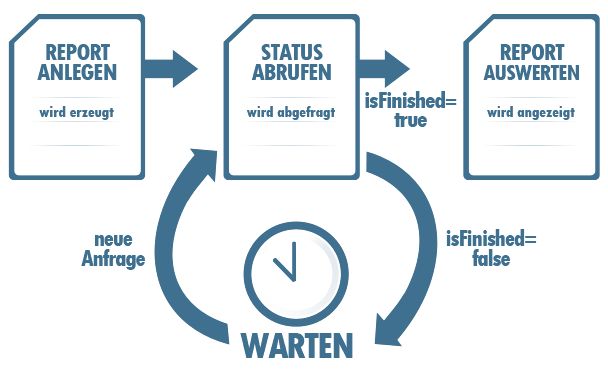
Create a report of earning statistics for any time period. The report contains the number of earned points for each surflink. The report is calculated asynchronously. The results should therefore be retrieved with a delay of 5 to 10 minutes.
$option['form_params'] = array('from' => '141100000', 'to' => '142200000');
try { print_r($client->post('visitor_exchange.json/account/surflink_earnings_report', $option)->json())."\n"; } catch (Exception $e){ echo $e->getMessage()."\n"; }
Response:
814Download a previously created report
Note: The report is not stored permanently. 12 hours after a report has been created, it may be deleted from the server.
$reportId = 814;
try { print_r($client->get("visitor_exchange.json/account/surflink_earnings_report/".$reportId,
$option)->json());} catch (Exception $e){ echo $e->getMessage(); }
Response:
Array
(
    [0] => Array
        (
            [surflinkID] => 288987
            [value] => 4484.900000
        )

    [1] => Array
        (
            [surflinkID] => 289092
            [value] => 7343.790000
        )
    ...
)
Request the current status of a report
$reportId = 814;
try { print_r($client->get("visitor_exchange.json/account/surflink_earnings_report/".$reportId."/status",
$option)->json()); } catch (Exception $e){ echo $e->getMessage(); }
Response:
Array

(

    [id] => 814
    [userID] => 714619
    [from] => 1424690754
    [to] => 1424777156
    [progress] => 100
    [type] => visit_earnings
    [isFinished] => 1
    [from_w3c] => 2015-02-23T11:25:54+00:00
    [to_w3c] => 2015-02-24T11:25:56+00:00

)
Delete a previously created report
 $reportId = 814;
 try { print_r($client->delete("visitor_exchange.json/account/surflink_earnings_report/".$reportId,
 $option)->json());} catch (Exception $e){ echo $e->getMessage(); }
Response:
1Get the total earning statistics of an account
Get a total statistic of the number of earned points within different time periods.
$date = array('from'=> 1415743232,'to'=> 1416520832);
print_r($client->get("visitor_exchange.json/account/earnings/".$date['from']."-".$date['to'],
$option)->json());
Response:
Array
(
    [0] => Array
        (
            [from] => 1424689202
            [from_w3c] => 2015-02-23T11:00:02+00:00
            [to] => 1424692799
            [to_w3c] => 2015-02-23T11:59:59+00:00
            [value] => 1987.200000
        )

    [1] => Array
        (
            [from] => 1424692801
            [from_w3c] => 2015-02-23T12:00:01+00:00
            [to] => 1424696399
            [to_w3c] => 2015-02-23T12:59:59+00:00
            [value] => 1384.000000
        )
    ...

)
Get hourly earning statistics
Total statistics (sum of all surflinks of an account) for a specific day. The number of earned points per hour from 1 to 24 is displayed.
$date="2015-02-19";
$option['query'] = array('timezone' => 'Europe/Berlin');
print_r($client->get("visitor_exchange.json/account/earnings_hourly/".$date,
$option)->json());
Response:
Array
(
    [1] => 3009.6
    [2] => 2753.6
    ...
)
Surflink
Get active surflinks activeSince : (optional), get only those surflinks that were used within a time period you specify (unix time format).
$option['query'] = array('activeSince' => 1424690754);
print_r($client->get("visitor_exchange.json/surflinks", $option)->json());
Response:
Array
(
    [0] => Array
        (
            [id] => 347876
            [fullName] => YOUR_LOGIN.surflink1
            [url] => http://www.ebesucher.de/surfbar/YOUR_LOGIN.surflink1
            [lastActivity] => 2015-02-24 11:59:17
        )

    [1] => Array
        (
            [id] => 347764
            [fullName] => YOUR_LOGIN.surflink2
            [url] => http://www.ebesucher.de/surfbar/YOUR_LOGIN.surflink2
            [lastActivity] => 2015-02-24 11:51:54
        )
    ...
)
Get earning statistics for a specific surflink Get a statistic of the number of earned points for a surflink within different time periods.
$data = array('surflinkName'=>'YOUR_LOGIN.surflink1','from'=>1424604354,'to'=>1424690754);
try { print_r($client->get("visitor_exchange.json/surflink/"
.$data['surflinkName']."/earnings/".$data['from']."-".$data['to'],
$option)->json()); } catch (Exception $e){ echo $e->getMessage();}
Response:
Array
(
    [0] => Array
        (
            [from] => 1424602861
            [from_w3c] => 2015-02-22T11:01:01+00:00
            [to] => 1424606399
            [to_w3c] => 2015-02-22T11:59:59+00:00
            [value] => 362.140000
        )

    [1] => Array
        (
            [from] => 1424606549
            [from_w3c] => 2015-02-22T12:02:29+00:00
            [to] => 1424609999
            [to_w3c] => 2015-02-22T12:59:59+00:00
            [value] => 240.800000
        )
    ...
)
Get hourly earning statistics
Get the hourly earning statistics for a specific surflink and a specific date. The number of earned points per hour from 1 to 24 is displayed.
$data=array('surflinkName'=>'YOUR_LOGIN.test','date'=>'2015-02-22');
$option['query'] = array('timezone' => 'Europe/Berlin');
try {print_r($client->get("visitor_exchange.json/surflink/"
.$data['surflinkName']."/earnings_hourly/".$data['date'],
$option)->json());} catch (Exception $e){ echo $e->getMessage(); }
Response:
Array
(
    [1] => 334.4
    [2] => 347.2
    [3] => 224
    [4] => 356.8
    [5] => 358.4
    ...
)
Share surflink settings
Allow the user to access the settings for displayed sites via their surflink. Optionally, you can limit the validity of the surflink to a specific time period.

FAQ
How many API requests do I have available?
The number of API requests is calculated per hour and depends on your account status.
Where can I see how many API requests I currently have left?
With each request, the corresponding limit and the currently remaining requests are returned as HTTP headers: (in the API explorer, see "Response Headers")
[..]
—> X-RateLimit-Remaining: 999
X-Auth-Status: true
Content-Language: en-US
Cache-Control: no-cache, must-revalidate
Transfer-Encoding: chunked
-> X-RateLimit-Limit: 1000 per hour
[..]
