

Low Bounce Rate and Returning Visits
The Visitor Session allows the advertiser to present an ad campaign up to 5 times consecutively to the same surfbar user. If multiple URLs are promoted through the same ad campaign, different pages can be presented to the visitor in sequence.
This also allows external visitor counters such as Google Analytics to measure a session duration. Measuring a session duration is a prerequisite for determining a meaningful bounce rate. By using the visitor session, a very low bounce rate, optimal dwell time, and returning visits are measured.
The visitor session lets you optimize your statistics on Google Analytics or other web analytics tools!
Enable Visitor Session
The visitor session can be enabled starting from registering a new ad campaign in the surfbar in Step 4. Under Deliver consecutive impressions, set the dropdown to Yes. Then define the number of consecutive impressions (maximum 5).
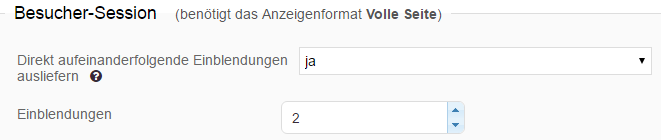
For existing ad campaigns, the visitor session can of course be enabled via the edit function. When the visitor session is enabled, the following icon is displayed under the display options.
Promote Multiple Subpages of a Domain via One Ad Campaign
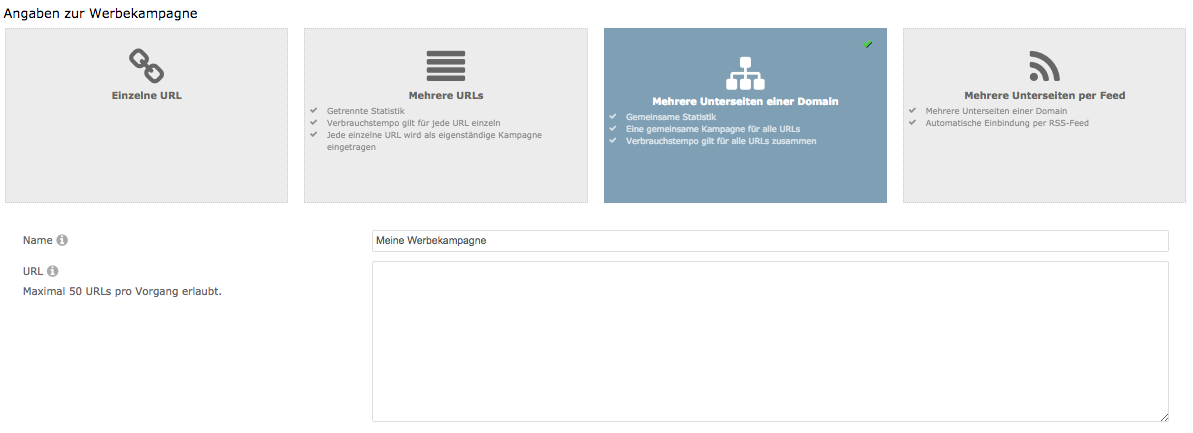
Using the visitor session is particularly useful when the advertiser promotes multiple subpages of a domain through a single ad campaign. A maximum of 50 different subpages per top-level domain and ad campaign can be registered.
By registering multiple subpages in the ad campaign, a random one of the registered URLs is promoted with each page view by a visitor. The visitor thus browses several different subpages of the domain one after another.
Subpages can be registered starting from creating a new ad campaign in the surfbar by selecting the Multiple subpages of a domain box (Step 1).
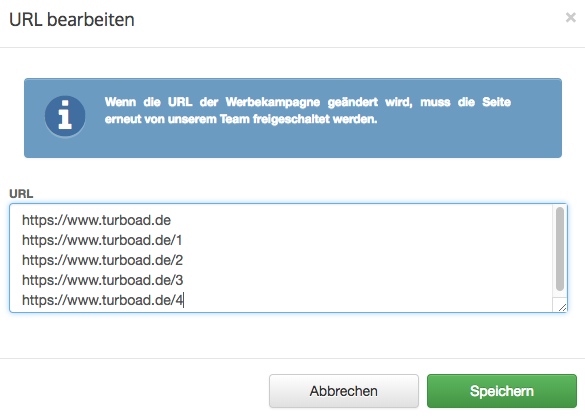
Of course, it is also possible to edit the URL afterwards or add additional URLs. To do so, simply go to the Advertiser Portal under Visitors > Manage Campaigns and open the ad campaign. Under Saved Information, you can see the registered URL — simply click on the wrench icon. A window will open where the URLs can be edited.
Retention Time, Session Duration, and Bounce Rate
There is a fundamental methodological difference between the terms retention time and session duration, which leads many advertisers to a false conclusion. Both terms refer to two completely different metrics that are similar but not comparable.
The retention time merely refers to the duration a visitor spends on a website during a single visit. Session duration, on the other hand, only becomes relevant when a visitor returns and multiple page views are generated. Web analytics tools therefore do not intend to measure the retention time or dwell time of a visitor!
Without using the visitor session, a high bounce rate and a low average session duration are often measured for visitors from the surfbar.
This phenomenon generally occurs whenever the IP suspension is used, provided that the IP suspension time interval is longer than the time window of a session. The IP suspension enables exclusive promotion of your ad campaign to individual visitors, which prevents a follow-up visit.

